
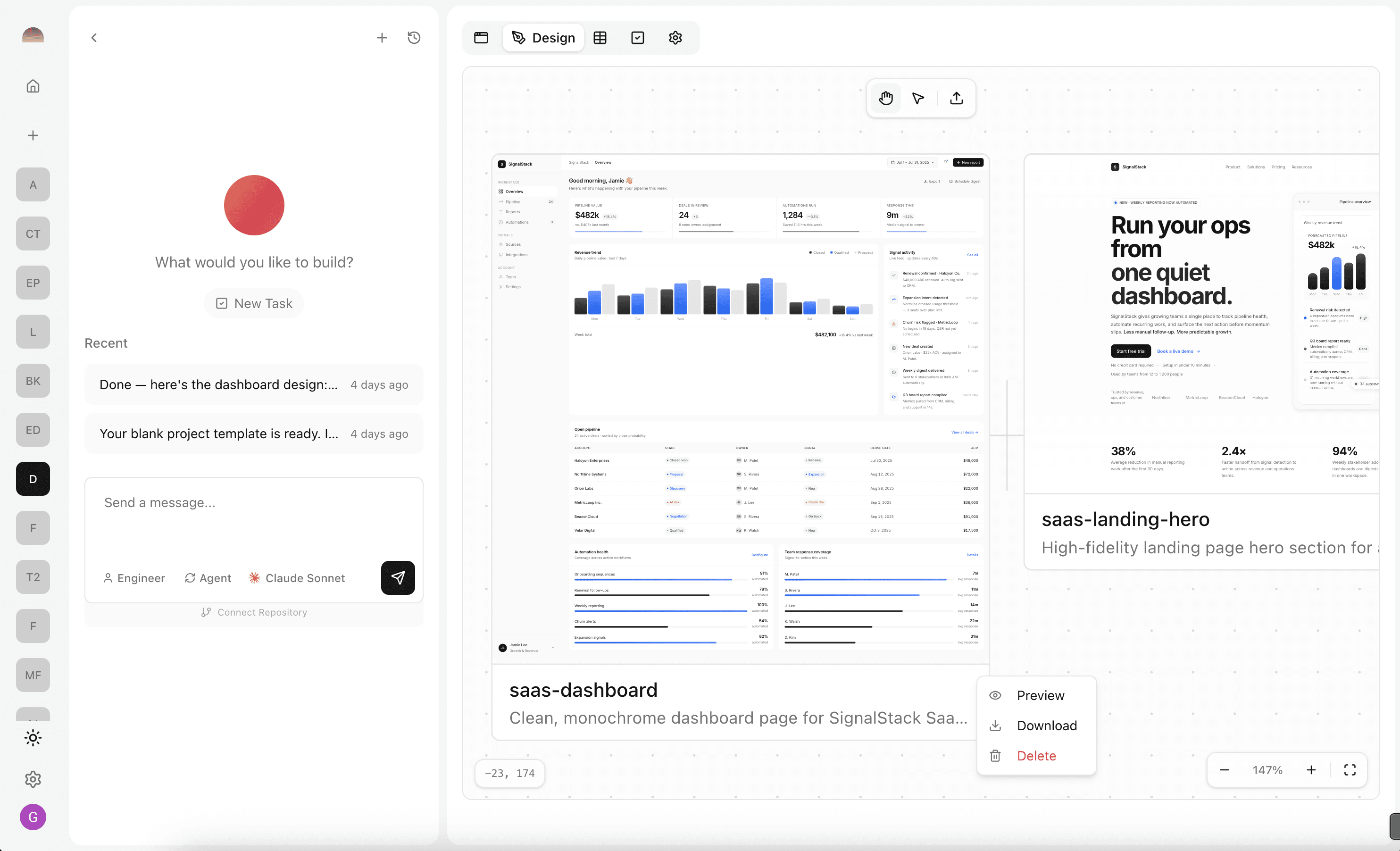
Subterranean's assistant now ships with two specialized roles: Engineer and Designer. While the Engineer handles code, databases, and deployment, the Designer focuses entirely on UI/UX — producing structured design documents and interactive visual prototypes that live alongside your project.
This means you can go from a rough idea to a polished design artifact without leaving your workspace, then hand it off to the Engineer to implement.
A Dedicated Design Role
Switching to the Designer is a single click. Open the chat assignee popover and choose Designer — marked with a purple indicator — to redirect the assistant toward design work. The Engineer role (blue indicator) remains available any time you need to switch back.
The Designer operates in two modes: agent mode, where it autonomously creates artifacts, and ask mode, where you can discuss layout decisions, color palettes, or component hierarchy before committing to anything. It's action-oriented by default, but conversational when you need it to be.
Design Documents and HTML Artifacts
The Designer Agent produces two kinds of outputs. First, DESIGN.md files — structured design documents that capture UI/UX decisions including layout specifications, component hierarchies, interaction patterns, and visual direction. These serve as living references that the Engineer can follow during implementation.
Second, interactive HTML artifacts — fully rendered prototypes that you can preview directly in the platform. The Designer writes the HTML, stores it securely, and surfaces it in your project's design tab automatically. No export step, no switching tools.
The Design View Canvas
When the Designer creates an HTML artifact, the design tab opens automatically and displays it on a pan-and-zoom canvas. Each artifact appears as a scaled-down card that you can preview full-screen, download, or delete via right-click. The canvas supports drag-and-drop upload too — just drop an HTML file onto it.
This gives you a dedicated visual workspace separate from the code editor. Review multiple design iterations side by side, compare approaches, and iterate with the Designer until the prototype is ready for implementation.